Saturday, 29 November 2008

Getting all functional

clip_image001Having done Biology at University rather than Computer Science, I regret having spent most of my career not really understanding why functional programming is so important.  I knew it was the oldest paradigm around, but assumed that it was just for mathematicians and scientists – business software needed something far better: imperative programming and object-orientation.  How naive was I?

Firstly through JavaScript, and then through delegates, anonymous delegates and Lambda expressions in C#, I was gradually introduced to a new world where you can pass functions around as though they are data.  Now that C# has an elegant and concise syntax for Lambdas, I feel rude if I don’t use it as much as I can!  I got to like this approach so much that I was easily seduced by the even more elegant functional syntax of F#.

F# has a really nice balance between the functional and the imperative, channelling you toward the former.  Whilst C# channels you toward the latter, it’s ever-increasing push towards being able to specify the “what” rather than having to manage the “how” has led it to embrace functional styles as well.  Monads, for example, in LINQ.

But why learn another language?  Certainly, if C# is getting all functional why bother with F#?  Surely there’s enough to keep up with besides learning a new language that might only come in useful every now and then.

Edward Sapir and Benjamin Whorf hypothesised that we think only in the terms defined by our languages:

We cut nature up, organize it into concepts, and ascribe significances as we do, largely because we are parties to an agreement to organize it in this way—an agreement that holds throughout our speech community and is codified in the patterns of our language [...] all observers are not led by the same physical evidence to the same picture of the universe, unless their linguistic backgrounds are similar, or can in some way be calibrated.

Several people including Iverson and Graham have argued that this also applies to programming languages. Its difficult to understand how we can frame a computing problem except in the terms of the languages available to us.  I do know that learning Spanish helped me think differently – and it certainly helped me understand English better.  I believe that learning F# helps you understand C# better – and between them they form a more complete framework for approaching software development.  Especially since they’re so interoperable.

So even if its just an academic exercise – its worth it.  Let’s expand our minds!

We’ll leave a discussion about why functional programming is so good for a future post.  In the meantime, I can recommend both these books.  “Foundations” is more readable, and “Expert” more thorough (neither assume any previous F# knowledge).


Tuesday, 18 November 2008

The elephant in the room

There's an elephant in the roomThere was lots of talk at Tech-Ed last week  about concurrency and parallel programming.  It’s becoming a real issue because we’re in the middle of a shift in the way Moore’s Law works for us.  Up until around 2002, we were getting a “free lunch” because processors were getting faster and more powerful and our software would just run faster without us having to do anything.  Recently, however, physical limits are being approached which slow down this effect.  Nowadays we increase processing power by adding more and more “cores”.  In order to take advantage of these, our programs must divide their workload into tasks that can be executed in parallel rather than sequentially.

We’ve got a big problem on our hands, though, because writing concurrent programs is not easy, even for experts, and we, as mere software developers are not trained to do it well.  The closest that a lot of developers get is to manage the synchronisation of access to shared data by multiple threads in a web application.
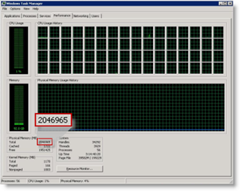
64 Core, 2 TB TaskManager This is a real screen shot of Windows Task Manager on a machine with 64 Cores and 2TB Memory.  I wouldn’t be surprised if we have entry level 8-core machines next year.  If we don’t do anything to take advantage of these extra cores, we may as well just have a single core machine.

There have been thread synchronisation and asynchronous primitives in the .Net framework since the beginning, but using these correctly is notoriously difficult.  Having to work at such a low level means that you typically have to write a huge amount of code to get it working properly.  That code gets in the way of, and detracts from, what the program is really trying to do.

Not anymore!  There is a whole range of new technologies upon us that are designed to help us write applications that can take advantage of multi-core and many-core platforms.  These include new parallel extensions for both managed and unmanaged code (although I won’t go into the unmanaged extensions), and a new language (F#) for the .Net Framework.

Parallel FX (PFX)

The first of these technologies is collectively known as Parallel FX (PFX) and is now on its 3rd CTP drop.  It’s deeply integrated into the .Net Framework 4.0 which is scheduled for release with Visual Studio 2010, and consists of Parallel LINQ (PLINQ) and the Task Parallel Library (TPL).  The latest CTP (including VS2010 and .Net 4.0) was released on 31st October and a VPC image of it can be downloaded here (although it’s 7GB so you may want to check out Brian Keller’s post for a suggestion on how to ease the pain!).

This is all part of an initiative by Microsoft to allow developers to concentrate more on the “what” of software development than on the “how”.  It means that a developer should be able to declaratively specify what needs to be done and not to worry too much about how that actually happens.  LINQ was a great step in that direction and PLINQ takes it further by letting the framework know that a query can be run in parallel.  Before we talk about PLINQ, though, lets look at the TPL.

Task Parallel Library (TPL)

The basic unit of parallel execution in the TPL is the Task which can be constructed around a lambda. The static Parallel.For() and Parallel.ForEach() methods create a Task for each member of the source IEnumerable and distribute execution of these across the machine’s available processors using User Mode Scheduling.  Similarly, Parallel.Invoke() does the same for each of it’s lambda parameters.

A new TaskManager class allows full control over how the Tasks are constructed, managed and scheduled for execution, with multiple instances sharing a single scheduler in an attempt to throttle over-subscription.

The TPL helps developers write multi-threaded applications by providing assistance at every level.  For instance, LazyInit<T> helps you to manage the lazy initialisation of (potentially shared) data within your application.

Additionally, a bunch of thread-safe collections (such as BlockingCollection<T>, ConcurrentDictionary<T>, ConcurrentQueue<T> and ConcurrentStack<T>) help with various parallelisation scenarios including multiple producer and consumer (parallel pipeline) paradigms.

Finally, there’s an amazing debugger experience with all of this.  You can view (in a fancy WPF tool window) all of your Tasks and the route they take through your application.  Moving around Tasks is no longer a game of Thread hide-and-seek!

Parallel LINQ (PLINQ)

Setting up a query for parallel execution is easy – you just wrap the IEnumerable<T> in an IParallelEnumerable<T> by calling the AsParallel() extension method.

AsParallelExtensionMethod 

In the latest CTP the overloads of AsParallel() have changed slightly making it even simpler to use.  In the example above I’ve specified a degree of parallelism indicating that I want the query to execute over 2 processors, but you can leave that up to the underlying implementation by not specifying any parameters.

The ForAll() extension method, shown above, allows you to specify a (thread-safe) lambda that is also executed in parallel – allowing for pipelined parallelism in both the running of the query and the processing of the results.

Running the example above produces the output below.  Although it’s running on a single proc VPC, you can still see that it’s using 2 threads (hash codes 1 & 3).  What’s interesting is that each item is both selected and enumerated on the same thread – this is really going to help performance by reducing the amount of cross thread traffic.

AsParallelOuput

Exception handling in the latest CTP is also slightly different from earlier releases.  Tasks have a Status property which indicates how the task completed (or if it was cancelled) and potentially holds an exception that may have been thrown from the Task’s lambda.  Any unhandled and unobserved exceptions will get marshalled off the thread before garbage collection and are allowed to propagate up the stack.

Daniel Moth did an excellent presentation on PFX at Tech-Ed which you can watch here.

F#

So what about F# then?  Well, it’s a multi-paradigm language that has roots in ML (it’s oCAML compatible if you omit the #light directive).  So it’s very definitely a first-class Functional language – but it also has Type semantics allowing it to integrate fully with the .Net Framework.  If C# is imperative with some functional thrown in, then F# is functional with some imperative thrown in (both languages can exhibit Object Orientation).

Data and functions are equivalent and can be passed around by value.  This, coupled with immutability by default, means that side-effect free functions can be easily composed together in both synchronous and asynchronous fashion and executed in parallel with impunity.  All-in-all this makes it very powerful for addressing some of the modern concurrent programming problems.  It’s not for every problem that’s for sure – C# is often a better choice – but the fact that it can be called seamlessly from any .Net language makes it easy to write an F# library for some specialised tasks.

Luke Hoban and Bart de Smet did some great talks at Tech-Ed on parallel programming using F#, and it blew me away how appropriate F# is for problems like these.  I’m really getting into the whole F# thing so I’ll save it for another post next week.

Thursday, 2 October 2008

National Rail Enquiries / Microsoft PoC (Part 1)

Updated (20/10/08)– removed IP addresses and other minor edits

Wow - great fun!  I was dev lead on a Proof-of-Concept project for National Rail Enquiries (NRE) at the Microsoft Technology Centre (MTC) in Reading.  Jason Webb (NRE) and I demonstrated it yesterday at a Microsoft TechNet event (I’ll post the webcast link when it’s available – Update: you can watch the presentation at http://technet.microsoft.com/en-gb/bb945096.aspx?id=396 – then click the link “National Rail Enquires” beneath the video) so it’s not confidential.  700 attendees (including Steve Ballmer – although he’d left before we were on) – there was no pressure!

At the MTC it was cool to work with a strong, focused team in such a productive environment.  I decided to do a series of posts on what I found interesting about the experience.  In this post I’ll give a short overview of the PoC’s output, with links to some screen captures.  Then I’ll dive into some detail about how we used graph theory to pull together some meaningful data.

In just 3 weeks we delivered 5 pieces:

Departures and Arrivals

1. A Silverlight 2.0 (beta 2) web-site app for viewing Live Train Departures and Arrivals, using Silverlight Deep Zoom, Virtual Earth, and Deep Earth.
(You can zoom in and see trains moving on tracks, click a train for live train journey information or click a station for arrivals and departures.
You can also see disruptions and late running trains.)

Train details popup
NRE-Incidents

2. A variant of the above showing live Incidents and Disruptions - basically a concept application for rail staff.  You can also see engineering works.

3. A Kiosk application that rotates around current incidents zooming in to show the location of the disruption. It also shows high-level rail network overview and performance statistics.
 

NRE-Kiosk1
Outlook plugin

4. A Microsoft Office Outlook plug-in that helps you plan a journey for the selected calendar appointment.
You can choose an outgoing and a returning train and it will mark out time in your calendar for the journeys.

5. And finally, a Windows Smart Phone application (see screen capture below) that shows live arrivals and departures for the selected leg of a journey.

NRE-Kiosk2

View Camtasia screen captures:

The outlook piece.

This is the Silverlight 2.0 web page app. (starts 00:30 seconds in)

This is the Windows Smart Phone application.

It's amazing what a great team can do in such a short time using today's extremely productive development tools!

So (every sentence at Microsoft starts with “So”) the team consisted of contingents from:

  • Conchango: A user experience consultant (Tony Ward), a couple of great designers (Felix Corke and Hiia Immonen), a couple of C#/Silverlight developers (myself and David Wynne) and a data expert (Steve Wright);
  • Microsoft: Project Manager (Andy Milligan), and Architect (Mark Bloodworth) and developers (Rob & Alex);
  • National Rail Enquiries (including Ra Wilson). 

Eleven of us in total, some for the full 3 weeks and some for less.

We faced some big challenges.  One of the more significant of which was obtaining good data to play with.  We wanted geographic data for the UK rail network.  We already had the latitude and longitude of each station and some coordinates for tracks, but didn’t know how the stations connected up!  Also the track data was really just a collection of short lines, each of which passed through a handful of coordinates.  There was no routing information or relationship with any of the stations!  So we had to imbue the data with some meaning.

quickgraph.banner.pngEnter Graph Theory.  It was straightforward to load all the little lines from the KML file into a graph using Jonathan 'Peli' de Halleux’s great library for C# called QuickGraph.  Each coordinate became a vertex in the graph and the KML showed us, roughly, where the edges were.  It didn’t work perfectly as there was no routing information – no data about what constitutes legal train movements.  Also the data wasn’t particularly accurate so our graph ended up with little gaps where the vertices didn’t quite line up.  But it was easy to find the closest of the 90,000 vertices to each of the 2,500 stations using WPF Points and Vectors:

private Vertex GetCloserVertex(Station station, Vertex vertex1, Vertex vertex2)
{
    Vector vector1 = station.Location - vertex1.Point;
    Vector vector2 = station.Location - vertex2.Point;
    return vector1.Length < vector2.Length ? vertex1 : vertex2;
}

imageWe had some timetable data that we used to extrapolate train routes and validate legal edges in our graph.  One problem is trying to determine what constitutes a valid train move.  In the diagram on the right it’s obvious to a human that whilst you can go from A to B and A to C you can’t go from B to C without changing trains.  The graph however, doesn’t know anything about walking across to another platform to catch a different train!

Once we’d validated all the edges in the graph we could do all sorts of clever things like running algorithms to calculate the shortest route between any 2 stations!  But the first thing we needed to do was validate the track “segments”.  This was relatively straight forward using Peli’s excellent library, although there isn’t much documentation or many examples out there so I’ve attached a code snippet…

In the snippet we find each station’s nearest neighbour stations so that we can create track segments between them and exclude those that don’t correspond to legal train moves (from the timetable):

private void CreateFinalGraph()
{
    IEnumerable<Vertex> vertices = _graph.Vertices.Where(v => v.Station != null);
    foreach (var vertex in vertices)
    {
        var neighbours = new Dictionary<Vertex, List<Edge<Vertex>>>();
        var algorithm = new DijkstraShortestPathAlgorithm<Vertex, Edge<Vertex>>(_graph, edge => 1);
        var predecessors = new Dictionary<Vertex, Edge<Vertex>>();
        var observer = new VertexPredecessorRecorderObserver<Vertex, Edge<Vertex>>(predecessors);
        Vertex vertex1 = vertex;
        algorithm.DiscoverVertex
            += (sender, e) =>
                   {
                       if (e.Vertex.Station == null || e.Vertex.Station == vertex1.Station)
                           return;
                       neighbours.Add(e.Vertex, GetEdges(vertex1, e.Vertex, predecessors));
                       // found a neighbour so stop traversal beyond it
                       foreach (var edge in _graph.OutEdges(e.Vertex))
                       {
                           if (edge.Target != vertex1)
                               algorithm.VertexColors[edge.Target] = GraphColor.Black;
                       }
                   };
        using (ObserverScope.Create(algorithm, observer))
            algorithm.Compute(vertex);
        foreach (var neighbour in neighbours)
        {
            var segment = new Segment(vertex.Station, neighbour.Key.Station,
                                      GetPoints(neighbour.Value));
            bool isLegal = !vertex.Station.IsMissing &&
                           SegmentLoader.ValidSegments[vertex.Station.Crs]
                               .Contains(neighbour.Key.Station.Crs);
            if (isLegal)
                _finalGraph.AddVerticesAndEdge(segment);
        }
    }
}

private static Point[] GetPoints(IEnumerable<Edge<Vertex>> edges)
{
    var points = new List<Point>();
    foreach (var edge in edges)
    {
        if (points.Count == 0)
            points.Add(edge.Source.Point);
        points.Add(edge.Target.Point);
    }
    return points.ToArray();
}
private static List<Edge<Vertex>> GetEdges(
    Vertex from,
    Vertex to,
    IDictionary<Vertex, Edge<Vertex>> predecessors)
{
    Vertex current = to;
    var edges = new List<Edge<Vertex>>();
    while (current != from && predecessors.ContainsKey(current))
    {
        Edge<Vertex> predecessor = predecessors[current];
        edges.Add(predecessor);
        current = predecessor.Source;
    }
    edges.Reverse();
    return edges;
}

First we iterated around all the vertices (coordinates) in the graph that have a station associated with them and walked along the edges until we found another vertex with a station attached.  That’s a neighbouring station so we can stop the algorithm traversing further in that direction by colouring all the successive vertices black (marks them as finished).

We attached an observer that records the predecessor edge for each vertex as we’re moving through the graph.  Because we’re using a shortest path algorithm, each vertex has a leading edge that forms the last leg of the shortest path to that vertex.  These predecessors are stored in the dictionary and are used to build a list of edges for each segment.  Although we’re creating 2,500 graphs, QuickGraph algorithms run extremely fast and the whole thing is over in seconds.

Finally we check that the segment is valid against the timetable and store it in the database.  The database is SQL Server 2008 and we’re storing all the coordinates as geo-spatial data using the new native GEOGRAPHY data type.  This allows us to query, for example, all stations within a specified bounding area.

In the next posts I’ll cover some of the detail around the back-end and the Silverlight front-end, sharing some experiences with Deep Zoom and Deep Earth.

Thursday, 7 August 2008

Early and continuous feedback - ftw

Feedback We’re having a beautiful summer here in London.  (Update: Typical!  That jinxed it!  Sorry.) It seemed like I would have been wasting it to rush back to work.  But feet get itchy.  So I’m very excited to be starting at Conchango on Monday as a Senior Technical Consultant.  I’ve known about Conchango for a while and theirs was the first name that came to me when I was thinking about who I’d like to work with.  Agile, modern, pragmatic, talented people etc. 

One thing that’s really impressed me is the feedback that I’ve been getting during the recruitment process (thanks Michelle).  At both interviews I was given immediate feedback (including from a technical test).  That’s something that’s never happened to me before!  I’ve probably only been for a dozen interviews in my career but I’ve interviewed lots more candidates.  Always the feedback has been something that happens after the event – I’ve been as guilty of it myself. Usually over the phone or in an email a few days later. But early feedback is very important.  It makes everything clear, transparent, honest.  It prevents time being wasted and gets things moving much quicker.

In Agile we depend on early feedback.  We can’t work without it.  The whole thing breaks down if the customer is not available to let us know what’s good and bad about what we’re doing.  It helps prevent us making speculative assumptions and wasting our time.  Test-Driven Development and Behaviour-Driven Development give us early feedback – green lights everywhere for that nice fuzzy feeling.  Make it fail --> Make it pass --> Make it right --> Feel good.  Feedback makes us feel good.  Early feedback makes us feel good sooner.

At London Underground we used a product from JetBrains called TeamCity for Continuous Integration (CI).  A lot of people use CruiseControl.  I found TeamCity easier to set up (it has loads of features and the professional edition is free).  Whatever tool we use, the reason we do CI is to give us early feedback – we know immediately when the build is broken or the tests start failing.  Why?  So that we can fix it straight away.  That keeps the team working and the software quality high.

All these feedback mechanisms help prevent us from introducing bugs (or going off on tangents) – or at least they help us catch problems early – and we know how quickly the cost of fixing stuff rises the longer it takes to discover it.  The feedback helps us get it right.  Everyone wins.

Feedback should be something we do all the time.  In every conversation we ever have.  I know one thing - I’ll never interview anyone ever again without giving them honest and immediate feedback at every stage.

Tuesday, 22 July 2008

The Language of Behavior

Software quality is directly proportional to the quality of communication that takes place between the business and the developers My mother researched our genealogy back several centuries and I’m just about as English as they come – so I decided to spell “Behavior” without a “u”.  That’s the correct way to spell it – at least it was before we changed it to please the French!  Plus it Googles better.

Why is this important?  Well, the spelling’s not.  But the language of behavior is.  Eric Evans in his book “Domain-Driven Design” coined the term “ubiquitous language” meaning that the domain model should form a language which means as much to the business as it does to the software developer.  Software quality is directly proportional to the quality of communication that takes place between the business and the developers – and speaking the same language is essential.  How the software behaves should be described in terms that have meaning to everyone.

Enter “Behaviour-Driven Development” (BDD) which takes “Test-Driven Development” (TDD) to the next level using the language from the “Domain-Driven Design” (DDD).  It’s the holy grail.  To be able to describe what an application is required to do, in the ubiquitous language of the domain, but in an executable format.

Developers hate testing.  They even hate the word “Test”.  Loads of developers just don’t get TDD. It’s because the language is wrong.  Take the T-word out of the equation and it suddenly makes more sense.  Replace it with the S-word.  Specification.  We’re going to specify what the application is going to do (using the vocabulary) in an executable format that will let us know when the specified behavior is broken.  Suddenly it all makes sense.

So in BDD we have the user story expressed in the following way:

As a <role>
I want <to do something>
So that <it benefits the business in this way>

Then the story can feed the specification using Scenarios:

With <this Scenario>:
Given <these preconditions>
When <the behavior is exercised>
Then <these post-conditions are valid>

Which is effectively the Arrange, Act and Assert (3-A’s) pattern ( Given == Arrange, When == Act, Then == Assert) for writing tests specifications.

And, don’t forget, the specification needs to be executable.  For this we would love to have a language enhancement – we actually need Spec# right now.  But we won’t get that for a while (although I encourage you to check it out, and petition Microsoft to get C# enhanced with DbC goodness).  So in the meantime, we need a framework.  In the .Net space several frameworks (NSpec, Behave#) came together to form NBehave.

Now you can write code like this:

[Theme("Account transfers and deposits")]
public class AccountSpecs
{
    [Story]
    public void Transfer_to_cash_account()
    {
        Account savings = null;
        Account cash = null;

        var story = new Story("Transfer to cash account");

        story
            .AsA("savings account holder")
            .IWant("to transfer money from my savings account")
            .SoThat("I can get cash easily from an ATM");

        story.WithScenario("Savings account is in credit")
            .Given("my savings account balance is", 100,
                 accountBalance => { savings = new Account(accountBalance); })
            .And("my cash account balance is", 10,
                 accountBalance => { cash = new Account(accountBalance); })
            .When("I transfer to cash account", 20,
                 transferAmount => savings.TransferTo(cash, transferAmount))
            .Then("my savings account balance should be", 80,
                 expectedBalance => savings.Balance.ShouldEqual(expectedBalance))
            .And("my cash account balance should be", 30,
                 expectedBalance => cash.Balance.ShouldEqual(expectedBalance))

            .Given("my savings account balance is", 400)
              .And("my cash account balance is", 100)
            .When("I transfer to cash account", 100)
            .Then("my savings account balance should be", 300)
              .And("my cash account balance should be", 200)

            .Given("my savings account balance is", 500)
              .And("my cash account balance is", 20)
            .When("I transfer to cash account", 30)
            .Then("my savings account balance should be", 470)
              .And("my cash account balance should be", 50);

        story.WithScenario("Savings account is overdrawn")
            .Given("my savings account balance is", -20)
              .And("my cash account balance is", 10)
            .When("I transfer to cash account", 20)
            .Then("my savings account balance should be", -20)
              .And("my cash account balance should be", 10);
    }
}

And you can run that in a test runner like Gallio (which even has ReSharper plug-in).  Just like you would run your NUnit/MbUnit/xUnit tests.

Jimmy Bogard, one of the authors of NBehave, wrote a great post about writing stories using the latest version (0.3).

NBehave is young.  But I love the fluent interface.  And the caching of the delegates.  And the console runner outputs a formatted (more readable) specification that you can give to the business.  It makes for really readable specs.

What about the granularity of these specs?  There’s definitely more than one thing being asserted.  But they’re much more than tests.  They are unit tests specs and acceptance tests specs combined. They define the behavior and check that the software conforms to that behavior, at the story and scenario level.  That’s good enough for me.  I’d much rather have this explicit alignment with atomic units of behaviour (OK, the English spelling just looks better).

Also, it reduces the coupling between the behaviour specification and it’s implementation, which means you can alter the implementation (refactor) without having to change the tests specs.  At least not as much as you might with traditional TDD.

To me it brings a great perspective to software development.  I’ve always believed in unit tests and in TDD.  This is just better.  By far.

Monday, 14 July 2008

Trust the experts

Our home in Betty's BayWhat better way to while away a 12-hour day-flight than to add a blog entry.  I’m off to Cape Town (actually Betty’s Bay where we have a small holiday home) for a week as I’m in-between jobs.  I just spent 4 years at London Underground (not a terrorist movement as US Immigration once thought I belonged to!).  It was by far the most challenging and rewarding role in my career.  It was there that I learned the most about writing great software.

I discovered what’s important.  I’ve always paid attention to detail and that’s important.  I’ve always made sure that I know my languages and tools inside-out and that’s important.  Communication with the customer (and the team) has got to be right up there.  The most important thing, though, to help a team write the best software, has got to be trust.  Not just trusting each other in the team – I already understood that.  Not just trusting the customer and having her trust us – also understood.  What I learnt at LU was that our management has to trust us.  Total trust.  Especially when we’re delivering. And delivering quality. Regularly, on time and in budget.  (I promise that this post is not going to turn into a rant because I’m actually grateful that I’ve learned this now, and that I can pursue the rest of my career without ever having to work again in an environment where management don’t trust and respect software development teams.)

It’s incredibly hard for people that don’t get software to get software.  The corollary is also true – it’s incredibly hard to help people that don’t get software to understand what it is all about.  To them it’s just magic.  All they can see (if they’re interested) is what the software does.  Not what it is.  Or what it takes to create it.

We do have an incredibly powerful tool in our arsenal.  Being ¨Agile¨ is the only way I know of breaking down the divide between those that understand and those that don’t.  Although even being agile is not enough if you’re labouring under bad management.

Upward Spiral

The first 3 years at LU were like a dream.  We were getting more and more agile by the day.  Everybody was winning.  The business were getting exactly what they wanted.  When they wanted it.  The team was strong.  And happy.  And very productive.  I’m not saying we were perfect – that doesn’t happen – there’s always further to go than you’ve already come.  But the management were excellent – they believed in us and that was the key.

Downward Spiral

Then, a year ago, new management came in and took over.  By stealth.  Crony appointments for unqualified people who subsequently protect their positions using Mugabe-esque power tactics.  Tarring everyone with the lowest-common-denominator brush.  Simply because they don’t understand software and are scared (actually terrified) that everything will collapse in a heap if they trust anyone.  So don’t trust anyone, don’t let anyone have any responsibility or let them make any decisions.  Even if they’re the only ones qualified to do so.  Bind everyone up with rules, process and bureaucracy.  Watch them with a hawk’s eye.  Control them and they’ll never put a foot wrong.

Wrong, wrong, wrong! Trust them and let them fly.  Trust the experts.  They’ve spent more time and effort learning their trade than the management have theirs.  They know what they’re doing (most of the time!).  Engage with them and let them help you understand software.  Get the best people you can afford.  No, get better people than you can afford.  Let them be agile.  Remove the weight of process. Respect their knowledge and watch the results.  It takes brave management to do that.  But its the only way to get great software and to keep the best developers.

Sunday, 29 June 2008

C# regions, inline comments and blank lines are not harmless

I didn’t want to call this “C# regions considered harmful” because that article has already been written – and even though there’s a backlash against articles with titles like this (¨Considered harmful¨ essays considered harmful), Rob Meyer’s article is spot on and should be read by every C# developer that uses regions in their code.

I don’t understand why regions were introduced into C#.  I guess they were meant to allow tools to hide generated code before partial classes were introduced.  Now they're just in the way.  I think I dislike them so much because they appear to be benign – you would think that a keyword that does nothing couldn’t do any harm.  But hiding code, without abstracting it away using proper OO techniques, encourages developers to write poorly structured code.

The default settings in Visual Studio that cause regions to be collapsed when you open a file don’t help (although you can change that: Tools –> Options –> Text Editor –> C# –> Advanced –> Enter outlining mode when files open).  If a file has collapsed regions in it I can press Ctrl-ML to expand them all in one go. Even better, I can take the regions out.  ReSharper has a File Structure tool window (Ctrl-F11) where you can delete a region by clicking the “x” in its top right corner.  To stop ReSharper adding regions when you format code: ReSharper –> Options –> C# –> Type Members Layout –> uncheck Use Default Patterns, then remove all <Group /> tags from the XML.

It’s not only regions that are used to delineate chunks of code.  Often inline comments, and even blank lines, are used in a similar way.  The comment’s text often describes what the chunk of code does.  Horrible.  Extract a method.  Or move the responsibility to another (maybe new) class.  Every time I find myself adding a blank line or an inline comment, I ask myself why?  Am I dividing up code?  Should I be calling a (new) method?  I'm not saying that inline comments are necessarily bad - they should just be reserved for stating the non-obvious.  Nor are blank lines necessarily bad - they should just be used to improve readability, not to divide a monolith.

A method should do one thing, and one thing only (Jeff’s post on this is great).  I should be able to grok what a method does instantly.  The first (major) clue to a method’s functionality is it’s name (which is really a Pascal cased sentence with a verb and everything!).  The name (and signature) tells me what I should expect the method to do. Then the body of the method confirms that.  A few lines of code that I can see in one glance and understand quickly.  A few lines of code that do one thing.  TDD/BDD helps keep our methods short and to the point.

A class should do one thing, and one thing only. The Single Responsibility Pattern (SRP) should keep our classes focused and cohesive.  No room for regions.  No need for regions.  If we adhere to the SRP then our classes should be fairly short – with not too many members.  That means that wrapping members in regions (with names like “.ctors”, “fields”, “properties”, “methods” etc.) is totally unnecessary, obstructive and thus counterproductive (although ordering the members within the class is essential).  The goal here has got to be: “I want other developers to be able to read and understand my code as quickly and as easily as possible” – meaning that I don’t want them to have to lift up all these region "carpets" to see what’s been swept underneath.